Changelog

Follow new updates and improvements to SupplyX GmbH.

February 24th, 2026

New

New: Shipment Dashboard for Forwarding Customers

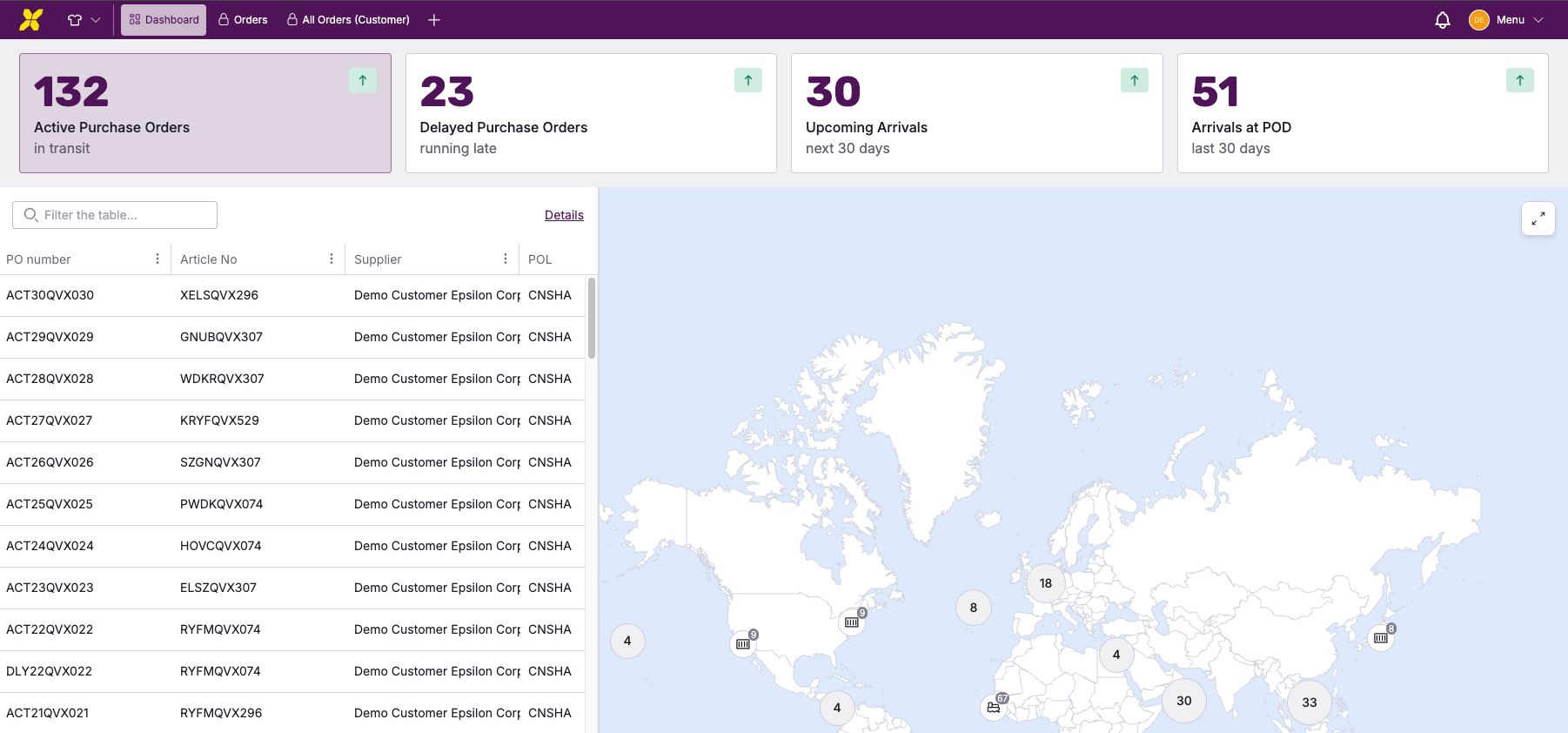
You now have a single, unified view of your sea freight shipments.

What’s new

  • Dashboard overview combining key shipment metrics, a world map, and a shipment table

  • Top filter cards to quickly switch between:

    • Active Shipments

    • Delayed Shipments

    • Upcoming Arrivals (next 30 days)

    • Recent Arrivals (last 30 days)

  • World map showing the positions of all transport ships. Click on a ship to view all details about the containers it is carrying.

  • Simplified shipment table with direct access to detailed views

How it helps

  • Instantly understand your overall shipment situation

  • See locations and statuses without navigating complex tables

  • Drill down from overview to details in one click

January 26th, 2026

New

Improved

At a glance

  • New Arrival POD & Departure POL columns
    New columns are available in VIEW and MOVE for all users. Existing Planned/Estimated/Actual date columns remain available. The new columns are hidden by default.

  • Improved date presets
    Date presets (e.g. Today, Tomorrow, Upcoming week) are now dynamic and based on the current date (e.g. today onwards, next 30 days).

  • New ETA deviation preset
    Added “All delayed” to show all shipments with any delay.

  • Updated ETA deviation ranges
    Date ranges adjusted to 1–6 days, 7–10 days, and 10+ days.

  • Clearer date status icons
    Arrival POD and Departure POL now use icons to distinguish planned, estimated, and actual dates.

Notable changes

  • A new Arrival POD and Departure POL column is available in both VIEW and MOVE environments for all user types. Because some users find it important to access the individual data points too, the former Planned/Estimated/Arrival columns are also kept in the grids. The new columns are hidden by default.

  • The existing date presets (e.g. “Today”, “Tomorrow”, “Upcoming week”) have been extended and reconfigured so that the date ranges are dynamically based off the current date (e.g. today onwards, next 30 days, up to today etc.)

  • ETA deviation filter has a new “All delayed” preset to display all shipments with any type of delay.

  • Date range for ETA deviation filter is updated to better suit user needs (“1-6 days”, “7-10 days”, “10+ days”).

  • The Arrival POD and Departure POL dates have specific icons that reflect the planned arrival/departure, ETA/ETD, and ATA/ATD dates.

November 11th, 2025

New

The digital platform now has a new, faster search function!

This allows users to find relevant entries much faster.

Advantages:

  • Quick overview: Simply enter one or more terms—matching lines are displayed immediately.

  • Fewer clicks: Customers no longer have to search through individual columns or set filters.

How it works:

  • The search looks in all columns at the same time.

  • You can combine multiple terms, e.g., DEHAM finalize. Then only rows containing both words will be displayed.

  • Upper and lower case letters do not matter – finalize and FINALIZE deliver the same result.

  • Special characters such as quotation marks (“ ”) or asterisks (*) have no special meaning – they are searched for as normal.

  • Hits are not currently highlighted in the text, but the matching lines appear in the list.

Samples

Search Value

Results

Finalize

Lines containing the word “finalize” anywhere

DEHAM finalize

Lines containing both terms

“Finalize Customs”

No results (quotation marks are searched for literally)

TGHU*

No hits (asterisk is not a placeholder)