Changelog

Follow new updates and improvements to SupplyX GmbH.

Export Shipment Visibility
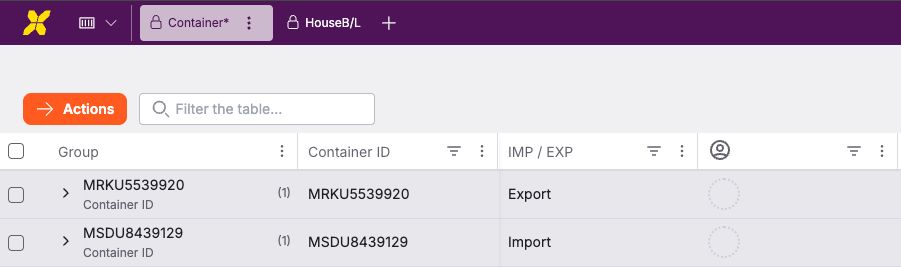
Export shipments are now visible and can be managed in the same grids and workflows as import shipments.

To make the distinction explicit and usable, all relevant container grids now include a new IMP / EXP column, and export-related email attachment documents are available in document management.

The new column is part of the default grid view and is positioned between Movement Type and Supplier.

Users can filter, sort, and group by the new column using the standard grid controls.

Stay in the Loop with "What's New"

We’ve made it easier than ever to keep up with the latest updates and improvements.

  • Quick Access: Authenticated users will now find a "What's New" action within their user account menu.

  • In-App Experience: Clicking "What's New" triggers a seamless popup window directly inside the platform interface.

  • Automatic Updates: Never miss a beat! When new changelog entries are published, the update notification can open automatically the next time you log in or return to the Platform.


How to use it

  1. Click on your User Profile/Account Menu.

  2. Select "What's New".

  3. Browse through our latest features, bug fixes, and improvements.

Release Notes for Shipment Dashboard

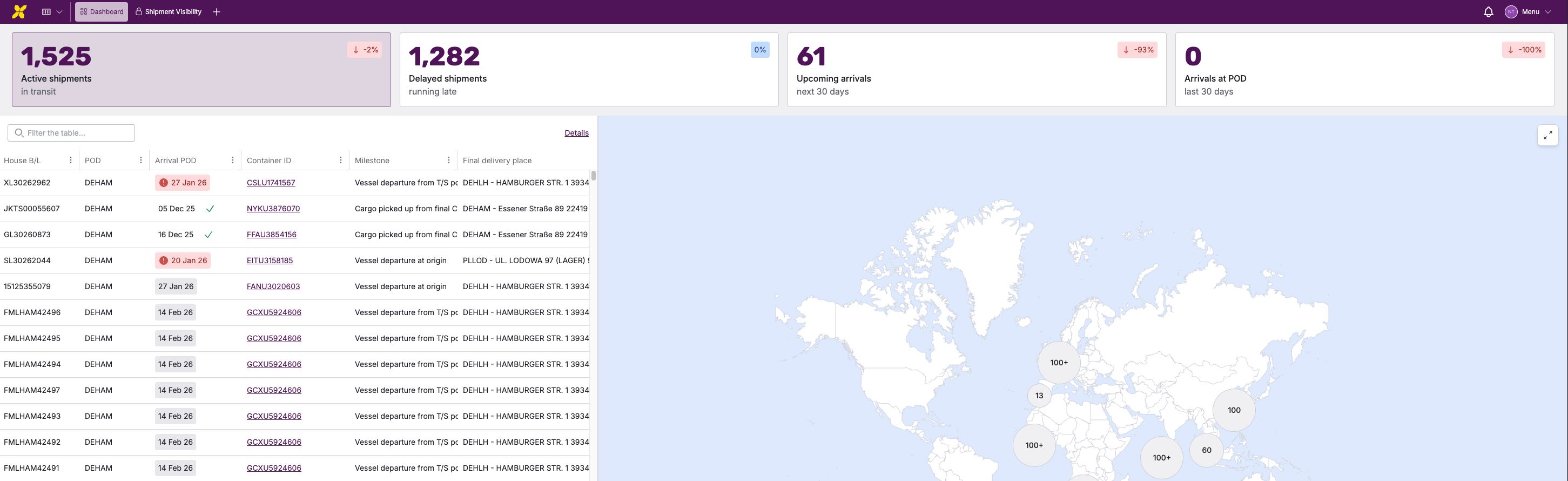
New: Shipment Dashboard for Forwarding Customers

You now have a single, unified view of your sea freight shipments.

What’s new

  • Dashboard overview combining key shipment metrics, a world map, and a shipment table

  • Top filter cards to quickly switch between:

    • Active Shipments

    • Delayed Shipments

    • Upcoming Arrivals (next 30 days)

    • Recent Arrivals (last 30 days)

  • World map showing the positions of all transport ships. Click on a ship to view all details about the containers it is carrying.

  • Simplified shipment table with direct access to detailed views

How it helps

  • Instantly understand your overall shipment situation

  • See locations and statuses without navigating complex tables

  • Drill down from overview to details in one click

Earlier updates