Release Notes: Unified arrival and departure columns
At a glance
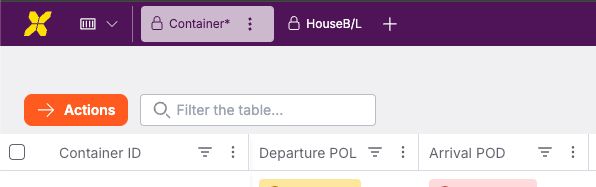
New Arrival POD & Departure POL columns
New columns are available in VIEW and MOVE for all users. Existing Planned/Estimated/Actual date columns remain available. The new columns are hidden by default.Improved date presets
Date presets (e.g. Today, Tomorrow, Upcoming week) are now dynamic and based on the current date (e.g. today onwards, next 30 days).New ETA deviation preset
Added “All delayed” to show all shipments with any delay.Updated ETA deviation ranges
Date ranges adjusted to 1–6 days, 7–10 days, and 10+ days.Clearer date status icons
Arrival POD and Departure POL now use icons to distinguish planned, estimated, and actual dates.
Notable changes
A new Arrival POD and Departure POL column is available in both VIEW and MOVE environments for all user types. Because some users find it important to access the individual data points too, the former Planned/Estimated/Arrival columns are also kept in the grids. The new columns are hidden by default.
The existing date presets (e.g. “Today”, “Tomorrow”, “Upcoming week”) have been extended and reconfigured so that the date ranges are dynamically based off the current date (e.g. today onwards, next 30 days, up to today etc.)

ETA deviation filter has a new “All delayed” preset to display all shipments with any type of delay.
Date range for ETA deviation filter is updated to better suit user needs (“1-6 days”, “7-10 days”, “10+ days”).
The Arrival POD and Departure POL dates have specific icons that reflect the planned arrival/departure, ETA/ETD, and ATA/ATD dates.
